 Be it your work email or your personal, a constant in today’s digital world are spam and or phishing emails. Let’s look at the differences between the two and how you should handle emails for which you are not certain of their intent.
Spam is defined as unwanted or unsolicited emails typically sent out in bulk to a large list of individuals. Spam generally is sent for a commercial purpose; however, spam can also potentially contain a malicious attempt to gain access to your computer or network, so handling it properly is important.
Phishing is a fraudulent communication appearing to come from a reputable source. The goal is to trick you into giving away sensitive data or to install malware, such as spyware on your system. Spear phishing is another form of phishing but instead of going out to a large list of individuals it targets one specific, often high-profile, individual.
Now that you know the differences and the potential threats, what can you do?
Virtually all email providers including your work email have filters in place attempting to block as much unwanted or malicious email as possible. However, those sending such malicious emails are always adjusting their methods which means you may be required to deal with it yourself from time to time.
Common things to look out for:
- Spelling and grammar mistakes
- Vague or missing information within the “from” field or email signature.
- The “to” field contains multiple random emails or has a list that appears to be alphabetized.
- Emails about accounts you don’t have or emails that are not associated with the email account in which you are receiving the email. For example, getting a PayPal or banking email to your work account.
- Emails from individuals within the company that are not from their work email accounts asking you to do things you normally wouldn’t. Such as, providing your bank account information or purchasing gift cards for them.
When in doubt never open any attachments, click any links, or reply to emails from an unknown sender. Instead, you should just delete the email from your inbox.
For questionable emails sent to your work account, we have a tool built right into Outlook that will help us constantly update and improve our filters and alert IT of potential issues.
See Steps below:
1. Open Outlook.
2. Highlight the email message you would like to report.
a) Click the Email Analysis button as shown below in Figure 1
i. If you have double clicked or opened the email in a separate window, the button will be different, this is shown in Figure 2.
ii. Click Catch Phish and you will see the same Email Analysis option as shown in Figure 1.
Figure 1

Figure 2

3. A side panel will open, and you will see the following, click <Next>:

4. A new window will open and will run a diagnostic on the information contained within the email for potential issues. When complete, it will provide you with a “report” of what it finds to be suspicious of the Sender, Links, Attachments, and Messages.
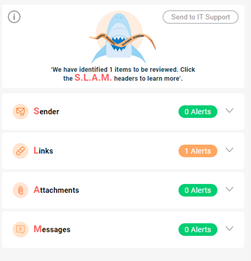
5. If the report finds something suspicious, click on Send to IT Support at the top right of the screen.
With the ever-increasing threats to cyber security, even with the best of intentions, sometimes we are fooled, and we accidentally click on a link or open an attachment that we should not have. If this does happen when on your work computer, please alert your supervisor or manager so that a ticket can be opened with EasyIT, and a quick review of your system can be completed to ensure everything is safe.